Effective 4 October 2026
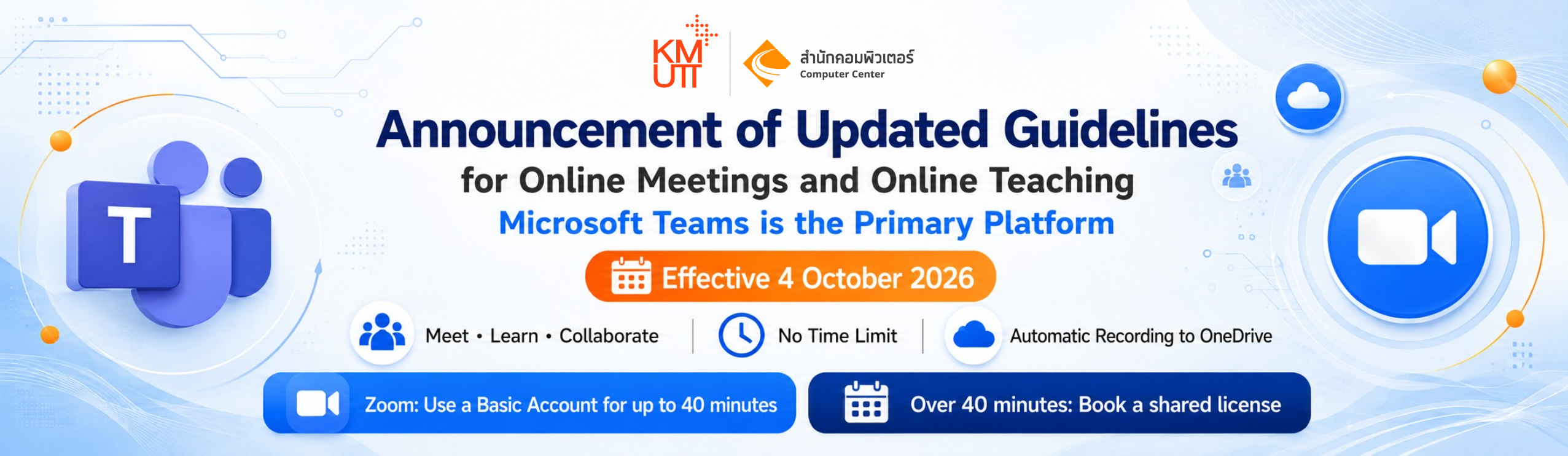
To ensure efficient and cost-effective management of the University’s software resources and to reduce service redundancy, the University would like to notify students, faculty members, and staff of changes to the guidelines for the use of online meeting and learning platforms. These changes will take effect on 4 October 2026, as follows:
1. Microsoft Teams as the Primary PlatformThe University has designated Microsoft Teams as the primary platform for online meetings and online learning for students, faculty members, and staff.
Users can :• Access Microsoft Teams using their personal University account at no additional cost.
• Hold meetings without a time limit and accommodate participants in accordance with the platform’s standard features and limitations.
• Use Microsoft Teams for meetings, online learning, and collaboration within the University.
2. Zoom Will Transition to a Shared-Pool License Model
Effective 4 October 2026, the University will discontinue individually assigned Zoom Licenses and transition to a shared pool of 100 Zoom Licenses for University-wide use. The shared pool will support up to 100 concurrent Zoom meetings. For users who need to use Zoom:
Meetings longer than 40 minutes
• Users who need to use Zoom can reserve and return a license through the “Zoom License Reservation System” for the actual period of use.
Meetings of 40 minutes or less
• Users can use a standard Zoom Basic Account immediately without reserving a Zoom License.
3. Transfer of Zoom Cloud Recordings
The University’s current Zoom License agreement will expire on 3 October 2026. Users who have meeting recordings stored in Zoom Cloud Recording and wish to retain them are requested
to download and transfer the files to another storage location such as:
• A personal computer
• The University’s OneDrive
• The University’s SharePoint
Please complete the transfer by 3 October 2026
to prevent any loss of data after the University’s current Zoom License agreement expires.
Policy and Guidelines for the Use of Online Meeting
and Teaching Platforms (Online Meeting)
Effective from Fiscal Year 2570 (B.E.) onward
Rationale
To ensure efficient management of the University’s software assets, optimize budget utilization, reduce duplication in software licensing, and maximize the benefits of existing resources, the University has established the Policy and Guidelines for the Use of Online Meeting and Teaching Platforms, effective from Fiscal Year 2570 (B.E.) onward. Microsoft Teams is designated as the primary platform, while the provision of Zoom services will be adjusted to suit actual usage requirements. as detailed below.
1. Primary Platform for Teaching and Online Meetings
• All faculties, departments, and supporting units shall use Microsoft Teams as the primary tool for teaching and learning, meetings, and communications both within and outside the University, with the objective of maximizing the value of the systems that the University has procured and invested in.
1.2 Microsoft Teams Access Rights
• University personnel and students can access Microsoft Teams at no additional cost using their University accounts under the @kmutt.ac.th domain.
2.Policy on Zoom Usage Rights Management
• As the individual Zoom licensing agreement will expire on 3 October 2569 (B.E.), the University will discontinue the allocation of all individual Zoom usage rights (Fixed Accounts) from that date onward.
2.2 Allocation of Central Zoom Licenses
• The University will adjust the Zoom licensing model to procurement based on actual usage requirements (Unit Price) by allocating 100 licenses as the University’s central usage rights (Shared-Pool Licenses) to support cases in which the use of Zoom is necessary.
2.3 Concurrent Use of Central Zoom Licenses
• The 100 central Zoom Licenses will be managed as shared licenses for users across the University, allowing up to 100 accounts or 100 online meeting rooms to be used concurrently at any given time.
2.4 Use of Zoom Basic Accounts
• Users who wish to use Zoom for meetings or online activities lasting no more than 40 consecutive minutes may use Zoom under a Basic Account without having to reserve or borrow a license from the central Zoom License pool.
3. Guidelines for Borrowing and Returning Central Zoom Licenses
To support cases in which Zoom is required for more than 40 minutes, the University has developed a Zoom License Borrowing and Return System to ensure the appropriate and equitable management of the central license pool. The following guidelines apply:
Requests for a central Zoom License will be considered for approval only in cases of high necessity, where continuous usage exceeds 40 minutes and the University’s primary platform cannot be used as an alternative.
Examples of necessary cases include:
• International academic conferences
• Meetings with external organizations that are subject to technical limitations
• Cases in which the use of Zoom is necessary and the University’s primary platform cannot be used as an alternative
3.2 License Reservation
• Users who meet the specified conditions must reserve a license in advance according to the actual date and time of use through the Zoom License Borrowing and Return System.
• The system is currently under development and testing. The University will announce further details, procedures, and official access channels in due course.
3.3 Automatic Return of Licenses
• At the end of the approved usage period, the system will automatically revoke the assigned license and return the Zoom License to the central pool, allowing the license to be efficiently allocated to other users during subsequent time slots.
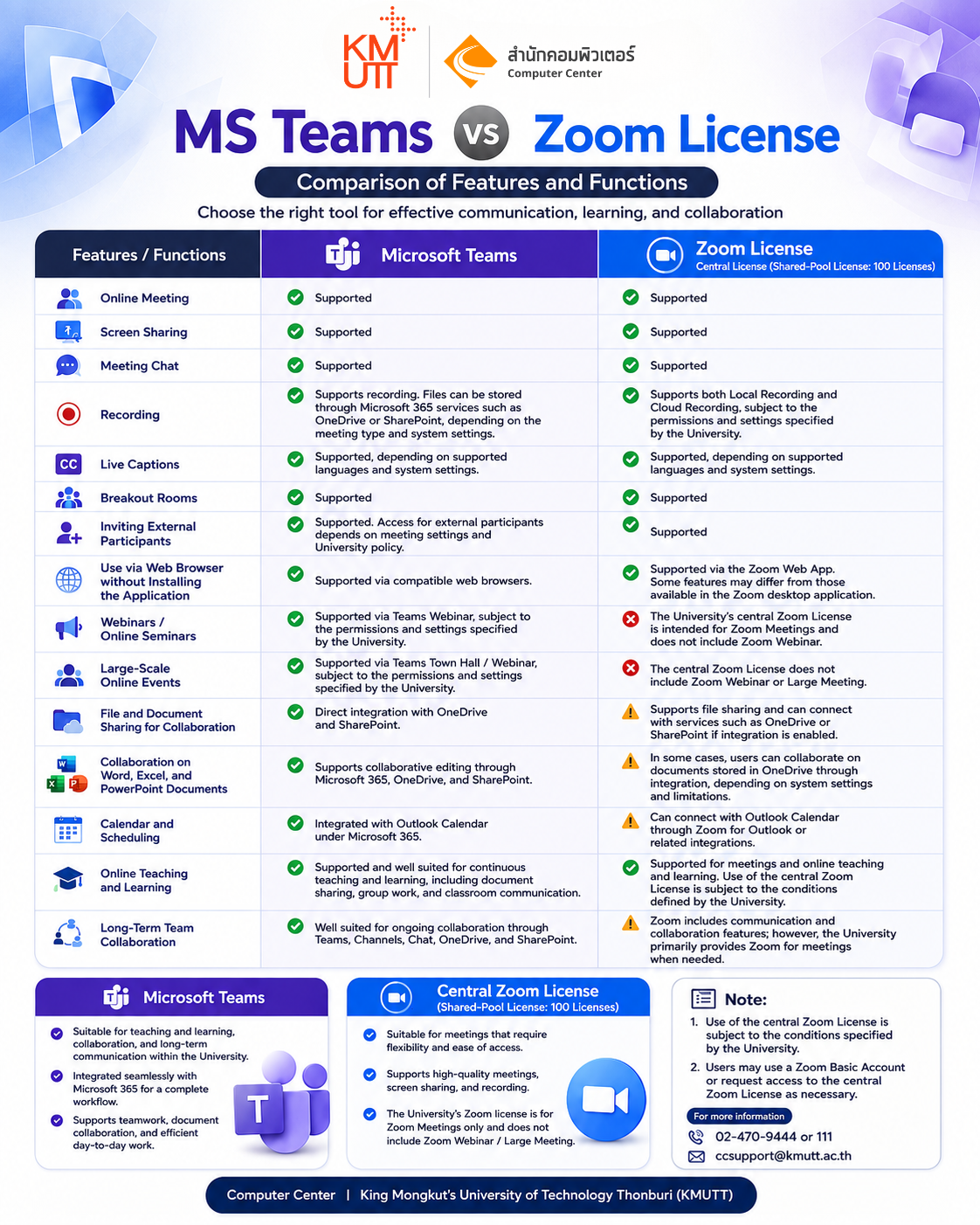
Microsoft Team VS Zoom License
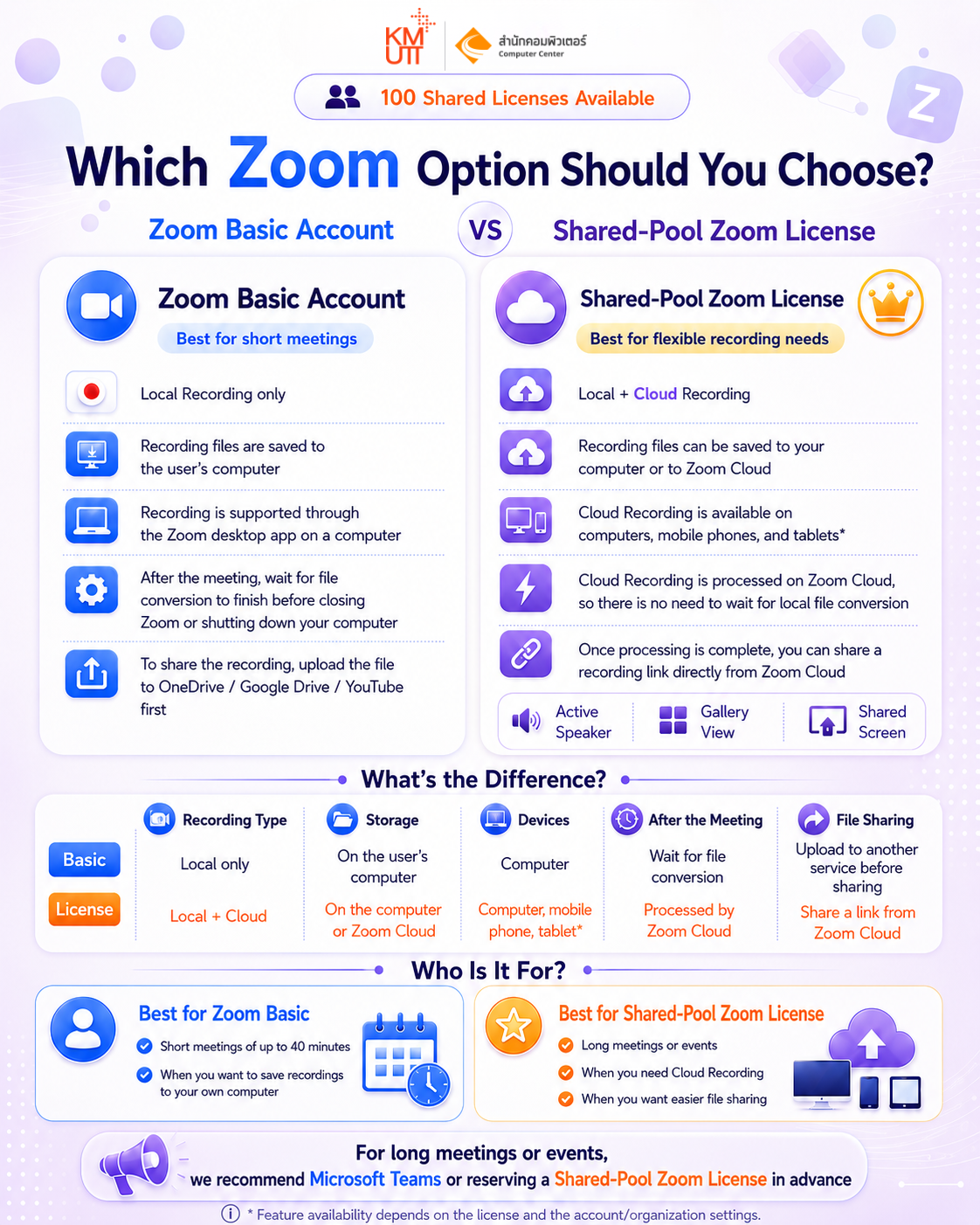
Zoom Basic VS Zoom License
Frequently Asked Questions (FAQ) on the Policy
and Guidelines for the Use of Microsoft Teams and Zoom m
This FAQ compiles frequently asked questions regarding the revised guidelines for the use of Microsoft Teams and Zoom, effective from Fiscal Year 2570 (B.E.) onward, to help University personnel and students prepare for the changes and select the appropriate platform for their needs.
Important Information for Zoom Users
The individual Zoom license agreement will expire on 3 October 2569 (B.E.). Users who have meeting recordings stored on Zoom Cloud and wish to retain them are requested to download the files to their computers or transfer them to the University’s OneDrive / SharePoint before that date.
Policy and Service Changes
Q1 Why has the University designated Microsoft Teams as the primary platform?
Based on historical usage statistics, the use of individually licensed Zoom accounts has been relatively low compared with the number of licenses procured by the University, while University personnel and students already have access to Microsoft Teams through their University accounts.
To ensure efficient software license management, reduce duplication, and maximize cost-effectiveness, the University has designated Microsoft Teams as the primary platform for teaching and learning, meetings, and online communication, while changing the Zoom service model to a Shared-Pool License with 100 licenses for cases where Zoom is necessary.
Q2 When will the new service model take effect?
The individual Zoom license agreement will expire on 3 October 2569 (B.E.), and the new Zoom service model will take effect from 4 October 2569 (B.E.) onward.
Zoom Usage and Shared-Pool Zoom Licenses
Q3 If I need to use Zoom for a meeting of no more than 40 minutes, do I need to request a Shared-Pool Zoom License?
No. Users may use a Zoom Basic Account for meetings lasting no more than 40 consecutive minutes without having to reserve or borrow a Shared-Pool Zoom License.
Q4 What should I do if I need to use Zoom for more than 40 minutes?
Users must reserve a license in advance through the Zoom License Borrowing and Return System based on the actual date and time of use.
When the reserved time begins, the system will temporarily assign a Zoom License to the user. At the end of the reserved period, the license will automatically be returned to the shared pool.
Q5 What does “100 Shared-Pool Zoom Licenses” mean?
This means that the University can support up to 100 Zoom meetings using Shared-Pool Licenses concurrently at any given time. If all 100 licenses are in use during a particular time period, users will not be able to make additional reservations for that period. They may select another available time period or use Microsoft Teams instead.
Meeting Recordings and Data Migration
Q6 What will happen to video recordings previously stored on Zoom Cloud after 3 October 2569 (B.E.)?
As the individual Zoom license agreement will expire, video recordings stored on Zoom Cloud will no longer be accessible after the agreement ends. Users who have important files are requested to download them to their computers or transfer them to the University’s OneDrive or SharePoint before 3 October 2569 (B.E.).
Q7 Can a Zoom Basic Account record meetings, and where will the files be stored?
Meetings can be recorded using Local Recording, in which the files are stored on the user’s computer. Recordings cannot be saved to Zoom Cloud. Users must conduct the meeting through the Zoom application on a computer, and after the meeting ends, they should wait until the system has finished processing and converting the recording into an .mp4 file before closing the application or shutting down the computer.
Microsoft Teams Usage and Support
Q8 If I have never used Microsoft Teams or am not familiar with it, how can I get assistance?
The Computer Center has prepared user guides, instructional videos, and online training courses to support the use of Microsoft Teams. Further details and access channels will be announced. Microsoft Teams provides essential features for online meetings and teaching, such as Breakout Rooms, screen sharing, background changes, and Polls.
Q9 What are the advantages of Microsoft Teams for meetings and teaching?
University personnel and students can access Microsoft Teams immediately through their University accounts. It supports continuous meetings, meeting links can be reused, and meeting recordings can be stored through Microsoft 365 services such as OneDrive. In addition, Microsoft Teams does not require users to reserve a Shared-Pool Zoom License, making it suitable for meetings and teaching activities that are conducted regularly.
Q10 Who should I contact if I encounter problems using Microsoft Teams, Zoom, or the Zoom License Borrowing and Return System?
You can contact the KMUTT Computer Center through the following channels:
- Tel. 02-470-9444 or 111
- E-mail: ccsupport@kmutt.ac.th
- MS Teams: ICT Service Desk For Staff
- Facebook: Computer Center of KMUTT
Teaching and Learning for Instructors
Q11 If I need to conduct a three-hour class but all Shared-Pool Zoom Licenses are fully booked during that time, what should I do?
Microsoft Teams is recommended as the primary platform for teaching and learning because it supports continuous teaching sessions, provides Breakout Rooms for group activities, and allows the same classroom link to be used continuously. If the use of Zoom is necessary, users may check the availability of Shared-Pool Zoom Licenses and reserve an available license for another time period.
Q12 Can external students or guest instructors who do not have a University account join a Microsoft Teams meeting?
Yes. The meeting organizer can send a Microsoft Teams meeting invitation link to external participants. External participants can join through a web browser, such as Google Chrome or Microsoft Edge, without requiring a University account.
Large-Scale Events and External Speakers
Q13 Which platform should be used for an international academic conference or webinar with more than 300 participants?
Microsoft Teams is recommended as the primary platform because it supports large-scale online meetings and events through features such as Teams Meeting and Teams Town Hall.
The Shared-Pool Zoom Licenses procured by the University are Zoom Meetings licenses, which support up to 300 participants and do not include Zoom Webinar or Large Meeting.
If a large-scale event needs to be conducted through Microsoft Teams and system consultation or technical support is required, please contact the Computer Center at least 7 working days in advance.
Q14 What should I do if an external speaker or organization requires the use of Zoom?
If there are restrictions imposed by an external speaker or organization and Microsoft Teams cannot be used as an alternative, a Shared-Pool Zoom License may be requested in accordance with the conditions specified by the University. The event organizer must reserve the license in advance through the Zoom License Borrowing and Return System based on the required date and time of use.
Reservation and Return of Shared-Pool Zoom Licenses
Q15 What should I do if I have reserved a Shared-Pool Zoom License but the event is cancelled?
Users are requested to cancel the reservation (Cancel Booking) through the system immediately so that the license can be returned to the shared pool and made available to other users who need to reserve it during that time period.
Q16 What happens when the reserved period for a Shared-Pool Zoom License ends while I am using it?
At the end of the approved usage period, the system will automatically revoke the license and return the Zoom License to the shared pool.
Users should therefore select a reservation period that covers the entire duration of the meeting or activity and allow sufficient time for preparation before the activity begins and for completion at the end of the activity.
 TOP
TOP