
The Computer Center, King Mongkut’s University of Technology Thonburi (KMUTT) would like to inform all Microsoft 365 account users that the Multi-Factor Authentication (MFA) system will be activated starting from December 15, 2025.
This initiative aims to enhance the security of Microsoft 365 user accounts and protect the university’s important data. All staff and students are required to complete MFA setup and verification to ensure continued, secure access to Microsoft 365 and other university information systems.
Adding phone verification (SMS or phone call)
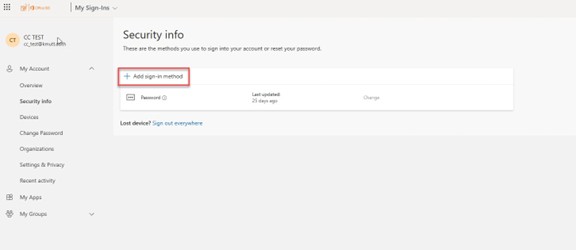
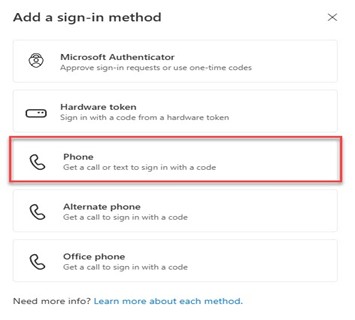
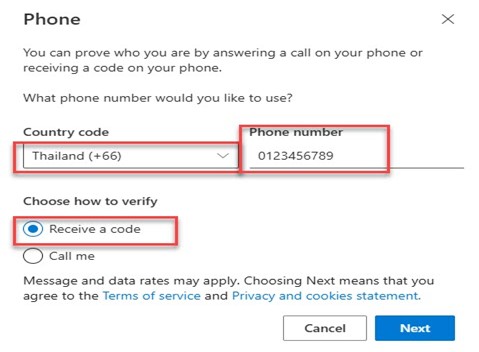
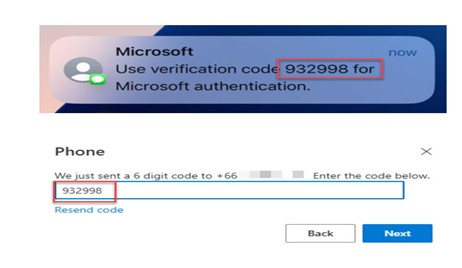
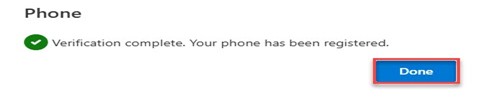
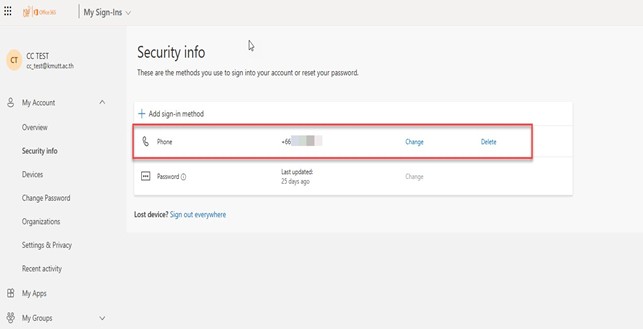
Phone verification is a method of confirming your identity through an SMS or phone call. A verification code will be sent to the phone number registered under your account. Please follow the steps below to complete the setup.
1. Go to https://myaccount.microsoft.com and sign in with your @kmutt.ac.th email account. Then, click the “UPDATE INFO” button.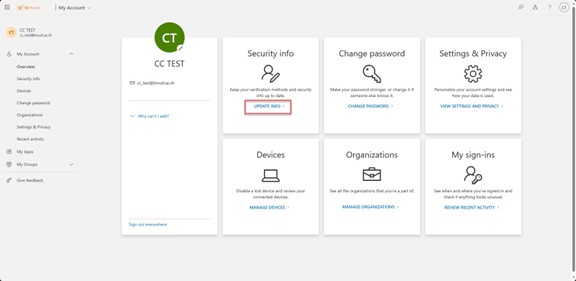
Setting up MFA using the Microsoft Authenticator Application
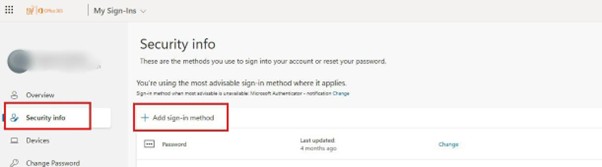
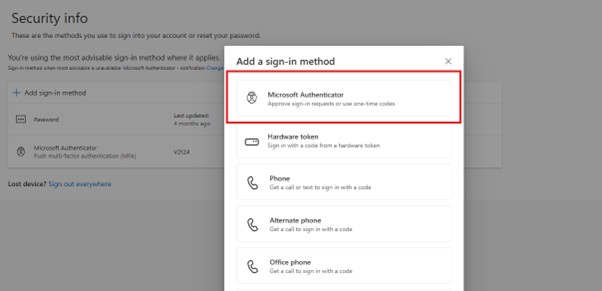
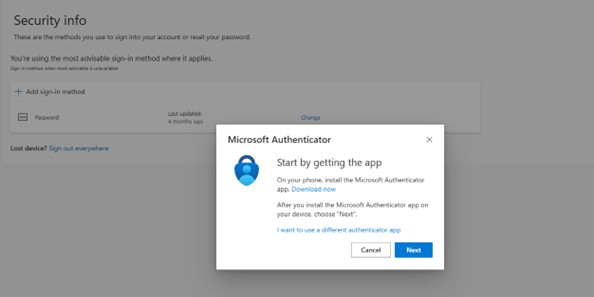
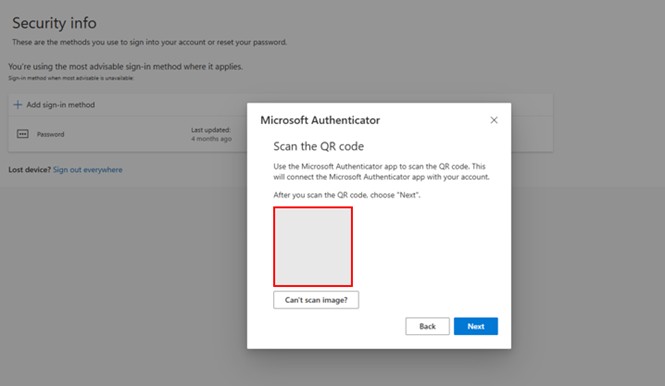
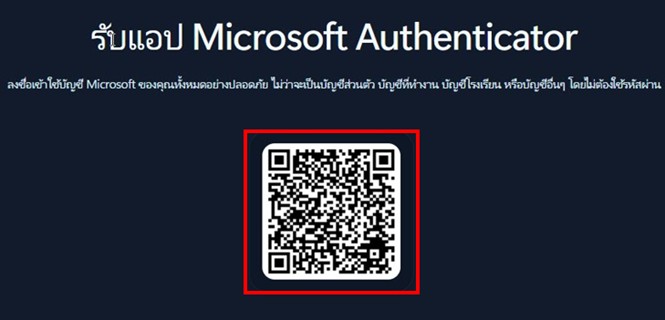
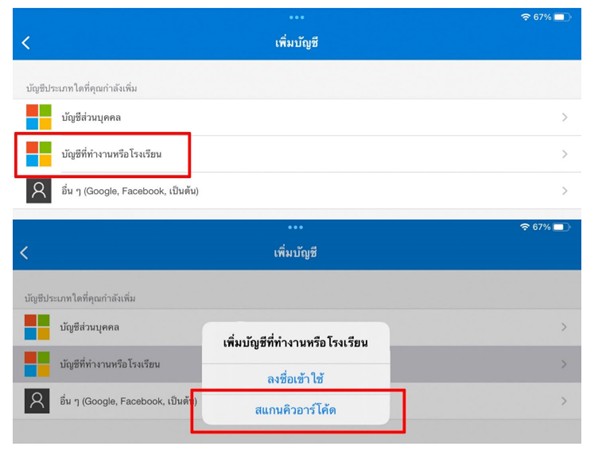
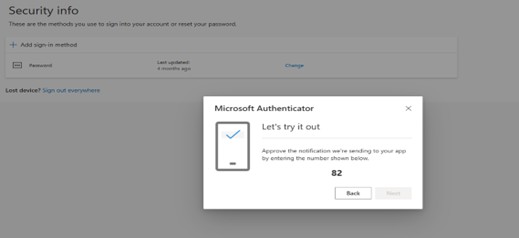
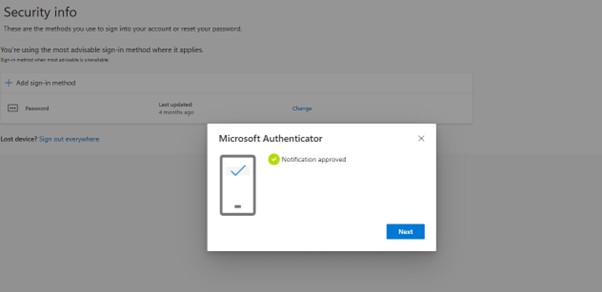
This method verifies your sign-in through the Authenticator App on your registered smartphone. Please follow the steps below to complete the setup.
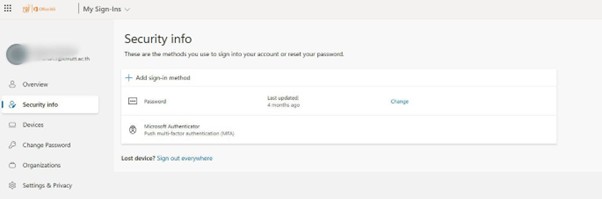
1. Go to https://myaccount.microsoft.com and sign in with your @kmutt.ac.th email account. Then, click “UPDATE INFO.”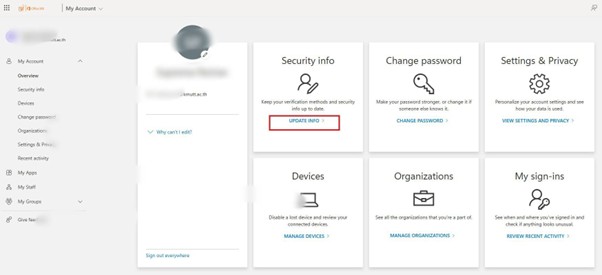
🔐 FAQ: Multi-Factor Authentication (MFA) using Microsoft Authenticator
To enhance the security of Microsoft 365 accounts and protect the important data of King Mongkut’s University of Technology Thonburi (KMUTT), the Computer Center would like to announce that the Multi-Factor Authentication (MFA) system will be activated starting December 15, 2025. This will ensure that all staff and students can access Microsoft 365 and other university information systems safely and securely.
Category 1: Overview and Basic Information
1. What is MFA (Multi-Factor Authentication)?
MFA is a multi-step authentication process that requires more than one verification factor (beyond just a password), such as approving a sign-in request via a mobile app or entering a one-time password (OTP), to enhance account security.
2. Why is KMUTT implementing MFA?
To protect your account from unauthorized access or impersonation, even if your password is compromised. This strengthens the overall security of personal and institutional data.
3. When will MFA be enforced?
MFA will be applied to all user accounts starting December 15, 2025.
4. Which services will MFA be used for?
Initially, MFA will apply to all Microsoft 365 services — including Outlook (email), Microsoft Teams, OneDrive, SharePoint, and other systems that require @kmutt.ac.th login.
5. Who must enable MFA?
All KMUTT students and staff with @kmutt.ac.th accounts.
Category 2: Preparation and Setup
6. What should I do before MFA is activated?
There are three key steps to complete before December 15, 2025:
1. Install the App: Download “Microsoft Authenticator” on your smartphone.
2. Set up MFA: Go to https://mysignins.microsoft.com/security-info to add your verification method.
3. (Recommended) Join the training session or read the setup guide provided by the Computer Center.
7.Where can I download the Microsoft Authenticator app?
You can download it for free from the App Store (iOS) or Google Play (Android) by searching for “Microsoft Authenticator.”
8. Can I set up MFA by myself if I don’t attend the training?
Yes. You can follow the step-by-step guide provided by the Computer Center. However, joining the training is recommended for a better understanding and to minimize potential setup issues.
9. Can I set up MFA if I forgot my Microsoft account password?
No. You must know your current password to access the setup page. If you forgot it, please reset your password at https://k-accounts.kmutt.ac.th/recovery or contact the Computer Center.
10.Can I register MFA on more than one device?
Yes. You can add a backup device (e.g., a tablet) through the Security Info page. This is highly recommended in case your primary device is lost or unavailable.
Category 3: Usage and Troubleshooting
11. What should I do if I get a new phone?
You must transfer your MFA settings before resetting or discarding your old device.
• Best method: Use the Backup & Restore feature in the Authenticator app to migrate your MFA data.
• If not backed up: Go to Security Info and select Add new device, then scan the new QR code.
• If you cannot sign in: Contact the Computer Center to reset your MFA configuration.
12. What should I do if I don’t receive the notification to approve sign-in?
• Check your Internet connection.
• Open the Authenticator app manually — pending requests may appear there.
• Check notification settings on your phone to ensure alerts are enabled.
• Use the 6-digit OTP instead by selecting “Use another verification method” on the login page.
13. What if I receive an approval request but I’m not signing in?
This may indicate someone else knows your password.
1. Tap “Deny” immediately.
2. Change your @kmutt.ac.th password at once.
3. Report the incident to the Computer Center.
14. What should I do if the app freezes or fails to open?
• Close and reopen the app, or restart your smartphone.
• Check for app updates in the App Store or Google Play.
• If the issue persists, reinstall the app (you may need to set up MFA again).
15. What should I do if I cannot set up or sign in with MFA?
It may be due to incomplete setup or technical issues. Please contact the Computer Center (see item 20) for assistance.
Category 4: General and Security Questions
16. Does MFA require an Internet connection?
• Yes, for push notifications (“Approve” requests).
• No, for 6-digit OTP codes — the app can generate them offline.
17. Can Microsoft Authenticator be used for other services besides KMUTT?
Yes. The app supports MFA for other platforms such as Google (Gmail), Facebook, Instagram, and personal Microsoft accounts.
18. What should I do if I accidentally delete the Authenticator app?
Reinstall the app and restore from backup if available. If not, contact the Computer Center to reset your MFA configuration.
19. What should I do if I receive suspicious emails or messages related to MFA?
Do not click any links or provide personal information. Forward the message to ccsupport@kmutt.ac.th for verification.
20. How can I contact the Computer Center for help?
You can reach the support team through any of the following channels:
• 📧 Email: ccsupport@kmutt.ac.th
• 💬 Microsoft Teams: ICT Service Desk For Staff (สำหรับบุคลากร)
• 🌐 Facebook Page: Computer Center of KMUTT
• ☎️ Phone: 02-470-9444
• 🏢 In person: Computer Center, Learning Exchange (LX) Building, 9th Floor
 TOP
TOP